Soft Navigations: The Missing Performance Story in SPAs
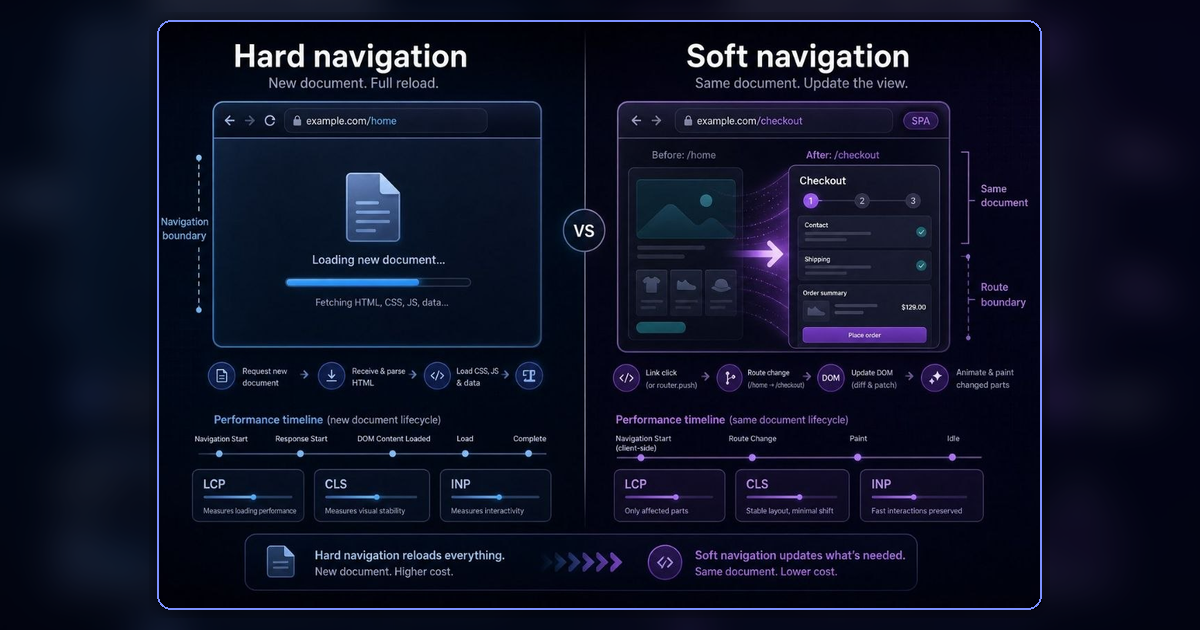
A Single Page App can move the user from /products to /checkout without the browser loading a new page. That is great for app-like UX, but it creates a subtle measurement problem: the user experiences a navigation, while the browser may still be living inside the same document.
That gap is what soft navigations are trying to close. They give the browser and performance tools a way to treat important SPA route changes as navigation-like moments, so we can measure what users actually waited for instead of only measuring the first document load.
The browser has one story. The user has another.
The traditional web has a clean performance model. You click a link, the browser requests a new HTML document, the old page is replaced, and a fresh page lifecycle begins. Metrics like LCP naturally belong to that new document.
<a href="/about">About</a>/home → new document load → /aboutThat is a hard navigation. The browser clearly knows a new page was loaded because it did the loading itself.
In a modern SPA, the same user action can look very different under the hood. JavaScript catches the click, fetches or prepares some data, updates the DOM, changes the URL with the History API, and keeps the current document alive.
<Link to="/about">About</Link>/home → JavaScript changes content + URL → /aboutThat is a soft navigation. My simple mental model is:
Hard navigation:
The browser loads a new document.

Soft navigation:
JavaScript changes the current document so much that the user feels like they moved to a new page.
This second model is where a lot of frontend apps live now. We built experiences that feel like pages, but technically behave like one long-running page that keeps changing itself.
The useful reframe
It is tempting to say, “SPAs are hard to measure.” I do not think that is the useful framing. Client-side routing is not the problem by itself; the problem is that many of our measurement boundaries are still attached to the initial document load.
A normal product journey might look like this:
/home
  → /search
  → /product/123
  → /checkout
In an SPA, all of this can happen inside one document. Your tooling may have a clean picture of /home, but only a blurry picture of /checkout. That is awkward because /checkout may be the page that matters most to the user and to the business.
This is the kind of thing I have seen teams struggle with in different forms. The dashboard says the page load is fine, but users still complain that a key flow feels slow. Often both are true. The initial page load might be fine, while a later route transition is doing too much work, waiting on the wrong data, or painting the important content too late.
You can optimize what you can see. Without good route boundaries, you are optimizing through fog.
Why LCP gets strange after the first load
LCP is straightforward on a normal page load. The user opens /article/soft-navigation, the browser loads the document, the hero image or main heading appears, and LCP is recorded for that page.
In an SPA, the user might start on /feed and then click into /article/soft-navigation. The app fetches article data and renders the article view. From the user’s side, a new page loaded. From the browser’s older lifecycle model, the same document changed itself.
That mismatch is the whole story. Classic LCP does not naturally restart just because your router changed views, but the user still had a loading experience. If the article image arrives late, the user does not care that there was no document navigation. They waited for the article, so the article felt slow.
Soft navigation measurement is an attempt to make the platform notice that distinction.
What Chrome is trying to detect
Chrome’s Soft Navigations API is experimental platform work for detecting navigation-like changes in SPAs. The current heuristic is intentionally user-centered. A soft navigation usually needs a user interaction, a visible URL change, and a visible paint.
In plain language:
If the user clicks something, the URL changes, and meaningful new content appears, the browser can treat that as a navigation-like moment.
That gives performance tools a boundary. Instead of treating a session as one giant SPA lifetime, tooling can start slicing it into route-sized moments:
Initial load:
  /home

Soft navigation:
  /search

Soft navigation:
  /product/123

Soft navigation:
  /checkout
This is not just a browser API detail. It is the platform learning to speak the same language as users. Users do not say, “the long-lived document had a delayed paint after an interaction.” They say, “checkout was slow.” Our tools should be able to say that too.
The moving parts
There are three ideas worth knowing: soft-navigation, interaction-contentful-paint, and navigationId. The names sound like browser plumbing, but the concepts are practical.
1. soft-navigation
This is the performance entry that says Chrome detected a soft navigation. When the experimental API is enabled, a PerformanceObserver can listen for it:
const observer = new PerformanceObserver(list => {
  for (const entry of list.getEntries()) {
    console.log("Soft navigation detected", entry.name, entry);
  }
});

observer.observe({
  type: "soft-navigation",
  buffered: true,
});
For RUM tools and framework authors, this is useful because they no longer have to guess every app’s routing behavior from scratch. The browser can provide a shared signal for navigation-like transitions.
2. interaction-contentful-paint
Think of this as an LCP-like idea for content that appears after a user interaction. The useful question is: after this click caused a route change, when did the important content appear?
For a product page, that might be the product image and title. For checkout, it might be the payment form. For a dashboard, it might be the main chart. The exact element depends on the product, but the pattern is the same:
User clicks product card
  ↓
App fetches product data
  ↓
App renders product detail page
  ↓
Large product image paints
  ↓
Browser can connect that paint to the click
That connection is the missing link for route-level SPA performance.
3. navigationId
Once the browser has navigation-like boundaries, related performance entries can be grouped together. Without that, you get a pile of events: clicks, paints, layout shifts, fetches, long tasks, and more paints. With a navigation boundary, the same data becomes easier to reason about.
/products
  - soft navigation
  - contentful paint after click
  - layout shifts
  - long tasks

/checkout
  - soft navigation
  - contentful paint after click
  - layout shifts
  - long tasks
The mechanism matters because debugging is mostly attribution. Once you know which route caused the bad experience, the next question becomes much easier.
A small ecommerce example
Imagine a product listing page where a click handler performs the transition itself:
productLink.addEventListener("click", async event => {
  event.preventDefault();

  const product = await fetch("/api/products/iphone-case")
    .then(response => response.json());

  renderProductPage(product);
  history.pushState({}, "", "/products/iphone-case");
});
From the code’s perspective, this is just a click handler. From the user’s perspective, this is a page load. That difference is where bad metrics hide.
If the fetch is slow, if the product image is too large, if hydration blocks rendering, or if the layout jumps after data arrives, the user blames the product page. They are right. Your tooling should not bury that inside a generic /products session; it should help you ask better questions:
- Did the route wait on API data?
- Did the route load too much JavaScript?
- Did the largest image arrive late?
- Did a skeleton layout shift when real content rendered?
- Did client-side rendering delay the first meaningful route paint?
That is the practical value of soft navigation measurement. It turns a vague complaint like “the app feels slow” into a route-level debugging problem.
What this changes for frontend teams
Soft navigations matter because they move SPA performance from vague session-level reporting to route-level debugging. The first page is often not the most important page in a product app. Search results, product detail pages, cart, checkout, dashboards, settings, and confirmation screens are often reached after the initial load through client-side transitions.
If those transitions are invisible or poorly attributed, the team optimizes the wrong thing. A well-built SPA can feel fast, and a badly-built MPA can feel slow. The architecture is not the experience. The useful question is simpler: when the user asked for the next thing, how quickly did the important thing appear?
There is also a tooling benefit. Frameworks already know a lot about their route transitions, but each framework has its own way of representing them. React Router, Next.js, Vue Router, Angular Router, SvelteKit, and custom routers all have slightly different surfaces. Browser-level soft navigation support gives generic performance tooling a shared foundation instead of forcing every team to hand-roll route timing forever.
What this does not replace
Soft Navigations API will not remove the need for app-level instrumentation. Your app still knows product-specific moments the browser does not know: product data loaded, above-the-fold content ready, checkout form usable, map tiles visible, dashboard widgets hydrated, recommendation carousel complete.
I would still add custom marks for those moments:
performance.mark("route:/products/start");

// fetch data, render UI...

performance.mark("route:/products/content-ready");

performance.measure(
  "route:/products/content-ready",
  "route:/products/start",
  "route:/products/content-ready"
);
The best setup is probably both: browser-level soft navigation metrics for standard route boundaries, and app-level marks for product-specific milestones. One gives you comparability. The other gives you context.
Where the heuristic can get messy
This is also why the API is still being tested. Not every UI change is a navigation. Opening a dropdown should probably not count as a soft navigation if the URL does not change and only a small menu appears. Clicking a product card where the URL changes from /products to /products/123 and the main content changes probably should count.
Real apps love edge cases, though:
- tabs that update the URL hash
- large content changes without URL changes
- instant transitions from preloaded data
- redirects inside the client router
- back/forward navigation
- modals that behave like pages
That is why Chrome’s conditions are careful: interaction, visible URL change, visible paint. The browser needs a heuristic that catches real navigations without turning every UI update into a page view.
What I would do today
Soft Navigations API is still experimental. Chrome’s latest update talks about a final origin trial from Chrome 147 to Chrome 149, with plans to ship later if feedback goes well. I would not build a critical cross-browser production dependency on it yet, but I would absolutely start thinking in this model if I worked on a routing-heavy SPA.
First, map your important route transitions. Pick the flows that matter: landing to search, search to detail, detail to checkout, login to dashboard, dashboard to report. For each transition, ask what starts it, what data blocks rendering, what the first meaningful content is, which image or component is likely to become the largest paint, and where layout shift can happen.
Second, add route-level marks now. You do not need to wait for a browser API to stop flying blind. Send those timings to your analytics or RUM pipeline. Even rough app-level timing is better than pretending the initial page load explains the whole session.
Third, test Chrome’s detection if your app is routing-heavy. Use the origin trial or DevTools support and check whether Chrome sees your important transitions correctly. Look for false positives, false negatives, and timings that do not match the user’s visible experience.
Finally, keep an eye on your RUM tooling. Once browser support matures, RUM vendors will likely expose cleaner SPA route-level metrics. That could change how frontend teams debug performance, especially for logged-in product surfaces where the most important journeys happen after the initial load.
The practical takeaway
Soft navigation is not a shiny new frontend pattern. It is a name for something we have already been doing for years: making a page feel like many pages. The platform is catching up to that reality.
That matters because measurement shapes engineering attention. If the dashboard only understands the first document load, teams will over-optimize the first document load. If the dashboard understands the user’s route journey, teams can optimize the moments users actually feel.
The implementation detail is not the experience. The route the user is waiting on is the experience.